
How to Create a Policy to Trigger Impossible Travel Alerts

An Impossible Travel alert is triggered when a user logs in from two different IP addresses in geographically distant locations within a short time window, which can be a sign of a compromised account. Follow the steps in this article to create a policy that detects it.
Create the Policy
Log in to your SpinOne account. From the left navigation panel, head to Security Policies > Policy Management, click + Create Policy, and choose Activity Policy.
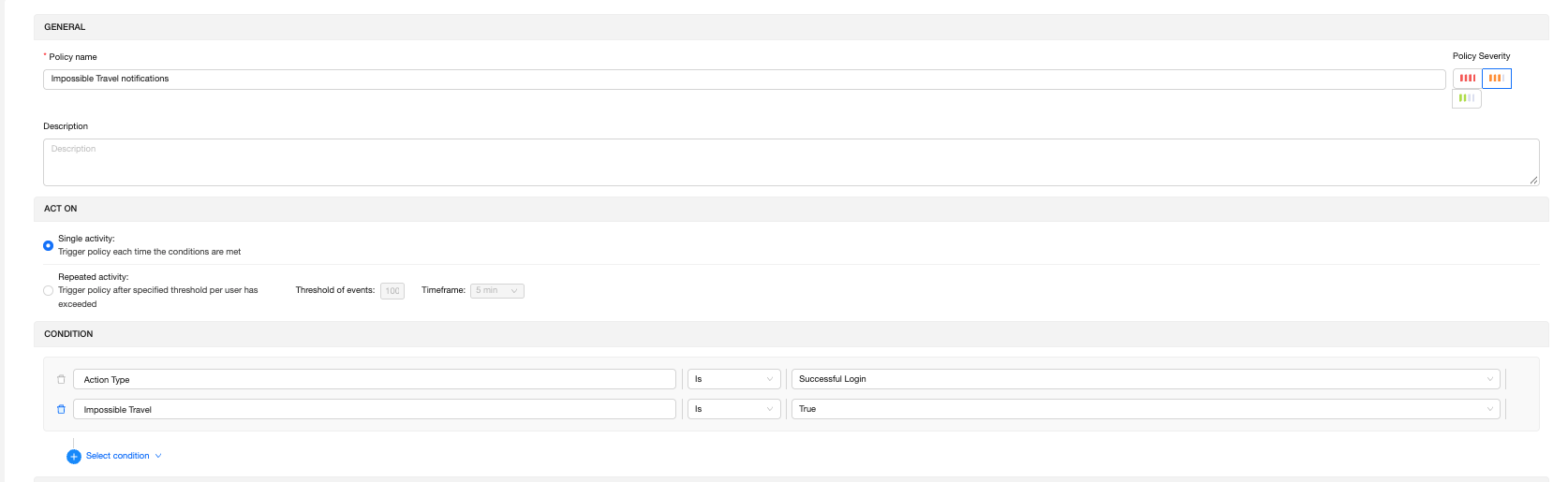
General: Enter a policy name (for example, Impossible Travel notifications) and choose the Policy Severity. A description is optional.
Act On: Select Single activity
Condition: Click Select condition and add the following two conditions:
- Action Type Is Successful Login
- Impossible Travel Is True
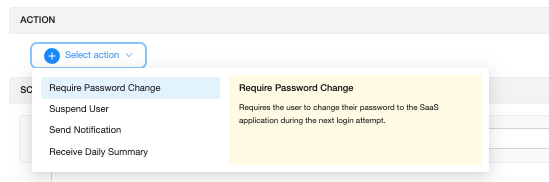
Action: Click Select action and choose what SpinOne should do when the policy triggers. You can select more than one:
- Require Password Change: the user must change their password at their next login.
- Suspend User: blocks the user’s access until you investigate.
- Send Notification: alerts your team each time the policy triggers.
- Receive Daily Summary: sends one daily email with all triggered incidents.
Scope & Exception: The policy applies to Everyone by default. To limit it to specific users or groups, or to exclude someone, click Select scope & exception.

Save the policy. That’s it!
If you have any questions or concerns, please contact us at support@spin.ai.
Get more information on Google Workspace™ Backup Solutions