Backup Retention Policy: Guide With Best Practices

TL;DR
A data backup retention policy defines how long information is stored, how it is managed, and when it should be securely deleted, helping organizations control data growth and avoid unnecessary storage costs .
The article emphasizes that effective retention planning must align both with business needs and with compliance regulations, which may require specific storage durations, geographic constraints, or mandatory deletion timelines. It outlines best practices such as classifying data by purpose, categorizing it by lifecycle, defining deletion rules, and determining the number and types of backup versions to retain.
The post also explains how choosing the right backup types and selecting a scalable, compliant backup service strengthens resilience and ensures efficient recovery during incidents. Altogether, these practices help IT teams reduce risk, maintain compliance, and streamline long‑term data management.
If you are an IT admin or a business owner, you want your backup strategy to save your money instead of wasting it. Setting up a proper backup retention policy will be the core element to focus on.
We witness the following mistake so often: businesses back up everything they have and keep it for as long as possible. As a result, they end up with enormous bills for storage or compliance violations.
A good backup retention policy solves this problem by determining what to keep and what to delete. Thanks to this, you can find and restore the necessary files much quicker while automatically disposing of the data clutter.
But how do you determine what data to keep and delete, and when?
As a data protection company, we’ve composed a list of data backup retention policy best practices and tried-and-true tips. We’ve saved the most useful bits of advice for the end, so be sure to stick with us!

What Is a Retention Policy?
A backup retention policy is a set of rules that define the lifecycle of backed-up data in an organization.
A backup retention policy should answer four practical questions.
- What backup data should be kept?
- How long should data be retained?
- Where and how should backups be stored?
- When should backup data be deleted?
In summary, a good retention policy helps organizations avoid two very common problems: keeping unnecessary data for too long and deleting important data too soon.
Needless to say, a retention policy is crucial for businesses of every size. It helps you manage your data and backups, allowing you to control your records’ growth.
Not having a retention policy will, at the very least, result in you spending lots of money on the storage of unnecessary files.
In the worst-case scenario, not having a data backup policy may lead you to be out of compliance by not keeping important data long enough or even storing it unnecessarily.
What Are the Two Things That Define Your Retention Policy?
To create a data retention policy, you need to know two things:
- Business needs the retention policy must solve for your organization;
- Compliance regulations regarding data applied to your organization.
How do you find out these things? Simply by seeking assistance from the law department and C-level management of your company.
1. Compliance regulations that apply to your organization
There are different compliance regulations that can be applied to your data. There are regional, country-specific, or industry-related laws. To comply with these, you may need to keep some data sets for years in data centers located in specific regions.
Sometimes, these regulations can even be mutually exclusive. In these cases, you need to address these issues with your law department or outsource compliance experts.
Read more about the most common data compliance regulations here→
2. Company Business Needs
To function properly, most companies rely on operational day-to-day data flow like emails, spreadsheets, text documents, etc. By backing up this business-critical information, you secure it from data losses and reduce the potential downtime due to disruptions that usually cost businesses a fortune.
The time for which you have to store this data depends solely on your business goals. The mistake many companies make is keeping this type of data for as long as possible. It feels like a safe choice, but it will only take up space and computing resources by piling up your storage with useless information.
To avoid this mistake, answer the following questions:
- What data to keep?
- Why do we need to keep it?
- For how long do we need to keep it?
If you aren’t sure about the answers, direct these questions to your company’s management/business department.
Backup Retention Policy: Best Practices to Follow
1. Classify Data By Type and Needs
As we pointed out earlier, your backup retention policy will be defined largely by external (law) and internal (company) needs. By this division, you understand the ultimate goal of every data piece and what the company needs they cover.
You may never need to use some data, but it has to stay put in a secure place for legal purposes. Meanwhile, the need for business continuity might dictate you to come back (recover) other data ASAP in the event of an incident.
When you categorize data this way, your retention policy’s other components will naturally fall into place. Plus, you get to understand the Recovery Time Objective (RTO) and Recovery Point Objective (RPO) for your data, which are the core of your disaster recovery strategy.
Here is how you need to classify data:
- What data is valuable from the point of compliance with regulations;
- What data is valuable from the point of your business needs;
- What data refers to public, proprietary, or confidential information.
2. Categorize Data by Lifecycle
Again, the lifecycle of backed-up data is strictly determined by the data retention compliance requirements and business goals.
Not all data should be stored for the same retention period. Moreover, some of the data simply can’t be stored and must be erased after a certain period of time. For one set of data, you may need to archive it for ten years and delete it right after this period has expired. For the other set of data, it must be more reasonable and cost-effective to delete it after some time because it’s outdated and not susceptible to any regulations.
By defining this, you can create a separate backup plan for each dataset depending on the time they should be kept and their purposes.
Here is how you can categorize data by their lifecycle:
- Records that should be retained for up to six months;
- Records that should be retained for one year;
- Records that should be retained for up to three years, and so on.
3. Decide What and When to Delete
Deleting data in time is one of those critical rules companies often fail to follow because it may feel counterintuitive. And yet, holding onto data when you should’ve deleted it potentially puts your company in hot water.
Here are the possible implications you may experience for not deleting data in time:
- Putting your company at risk of legal proceedings and penalties for non-compliance;
- Risking your client’s data security and your reputation;
- Cluttering and overburdening your hardware/software with unnecessary data;
- Spending money on extra storage occupied with data that has no value for the company;
- Making data navigation too complicated.
Some compliance regulations make it obligatory to schedule the secure deletion of data that falls under certain categories and matches certain criteria. For example, article 5 of the General Data Protection Regulation (GDPR) states that organizations must destroy personal data that are proven to be no longer required for business or legal purposes.
By defining what data should be deleted and setting up the Purge function, you automatically erase files that match certain criteria. But we recommend keeping at least one last version of the file on the off-chance unless the law determines otherwise.
4. Define the number and type of versions to store
The backup version is a copy of the original file that contains all changes that have been made to a document.
Use these parameters of the versioned backup:
By the number of versions to store:
- Additional (inactive) versions
- Last versions of files that have been deleted
By the amount of time to store:
- Existing data
- Deleted data
5. Decide about the types of backup and their frequency
There are three types of backup:
- Full backup – a full copy of all existing files;
- Differential backup – a copy of all changes made from the last full backup;
- Incremental backup – a copy of all changes since the last backup of any kind (full, differential, or incremental).
To understand which backup type will be the most beneficial for your business, read our guide to Full vs. Differential vs. Incremental Backups.
6. Choose a Compliant and Cost-Effective Data Backup Service
Unless you have already set up on-premises systems to back up your data or chosen a third-party service, you’ll need to select a reliable backup service. There are many secure backup providers on the market, and you need to choose the one that meets your needs perfectly.
Here are the key things to consider when choosing a perfect backup provider:
1. Cloud-to-Cloud or On-Premises.
There are many pros and cons to both options, but we are of the opinion that if you keep your data in the cloud services like Google or Microsoft, cloud-to-cloud backup is the best option for your business. We justify our opinion in this article.
2. Scalability and Flexibility.
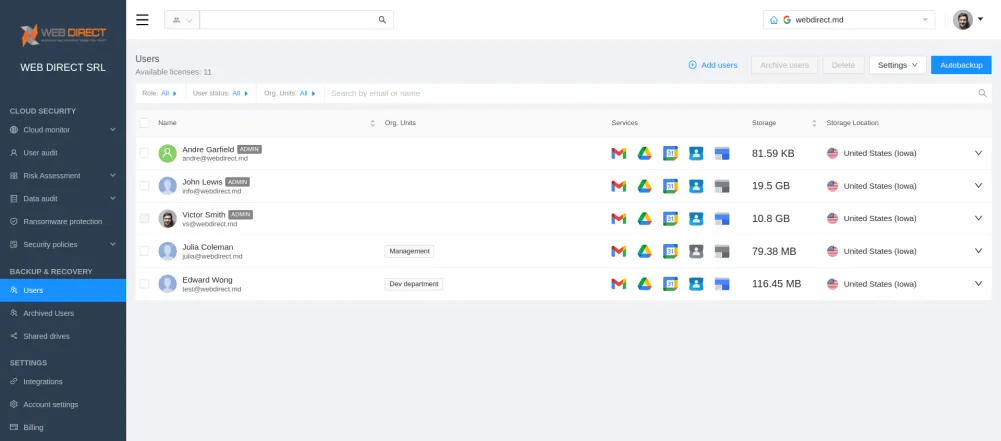
By these words, we mean the ability to start from the minimum number of licenses and scale it when your business grows. Some backup services have prefixed numbers of licenses you have to buy to start using the service, which may be a waste of money for small businesses.
The SaaS subscription model with monthly payments and a minimum number of licenses to start from is usually the most cost-effective option for most businesses due to its flexibility.
3. Type of Backup and Restore.
For small-to-medium businesses that keep data in the cloud, a backup service with an incremental-based backup model, granular restore, and version control will be the best fit.
To get the full list, read our guide →How to Choose a Perfect Backup Service in 10 Steps
P.S.: To see how professional backup service works:
Frequently Asked Questions
Many businesses often store complete copies of their data for up to a year or more. On the other hand, incremental backups, which only save changes made since the last full backup, may not need to be retained as long. This is because if anything goes wrong, you can simply revert to the previous full backup to restore the data.
In the field of Information Technology (IT), “backup” refers to the process of creating copies of data so that it can be recovered and accessed by users if necessary. On the other hand, “retention” refers to the rules or guidelines that determine how long the backed-up content should be kept before it can be deleted. Essentially, while backup is about ensuring data availability, retention is about defining the time frame for keeping that data.
The 3-2-1 backup rule is a widely recommended strategy for data protection that follows a specific structure to ensure that data is safeguarded against loss. Here’s how it breaks down:
- 3 – Have at least three total copies of your data. This includes the original data and two additional backups.
- 2 – Store these backups on two different types of storage media or platforms. This can mean having one copy on a physical hard drive and another in cloud storage, for example. By diversifying the storage media, you minimize the risk of simultaneous failure.
- 1 – Keep one of these copies off-site. This could be in a geographically distant location or with a specialized off-site backup provider. The idea is to protect against localized disasters like fires or floods that might destroy on-site backups.
By adhering to the 3-2-1 rule, you ensure that even if one backup fails or becomes corrupted, you’ll have other copies in different locations and on various media, reducing the likelihood of catastrophic data loss.