
Command Center for Jira
The only unified platform for Atlassian data—Jira Software, JSM, JWM, JPD, Assets, and your critical third-party apps that combines enterprise-grade backup and granular restore with no-code configuration management, all in a single, native interface.


Trusted by enterprise teams at






Atlassian is responsible for their platform.
You are responsible for your data.
The Atlassian shared responsibility model means Jira Cloud protects its infrastructure from going down—but accidental deletions, insider threats, bad imports, and third-party app errors are yours to handle. Most teams only discover this gap after data is already gone.
Malicious or Accidental Deletion
A disgruntled employee or compromised admin account can delete a critical Jira project in seconds. A full site restore is too disruptive; you need surgical recovery.
Human Error & Data Corruption
A bad Jira import or flawed bulk-edit can corrupt thousands of work items instantly. You need granular, item-level restore without rolling back the entire instance.
Third-Party App Errors
Faulty marketplace apps can corrupt data across Jira and JSM. The responsibility for rolling back only the affected items falls entirely on you, not the app vendor.
Configuration Drift & Broken Deployments
When sandbox and production drift apart, deployments fail and break critical workflows. Without version control and rollback, you’re flying blind into every change.
Everything your Jira environment needs.
One platform, zero gaps.
Command Center for Jira is an integrated suite of applets covering Configuration Management, Data Resilience, and Administration—all from a single native interface in your Jira Cloud instance.

Configuration Manager (Sandbox to Production)
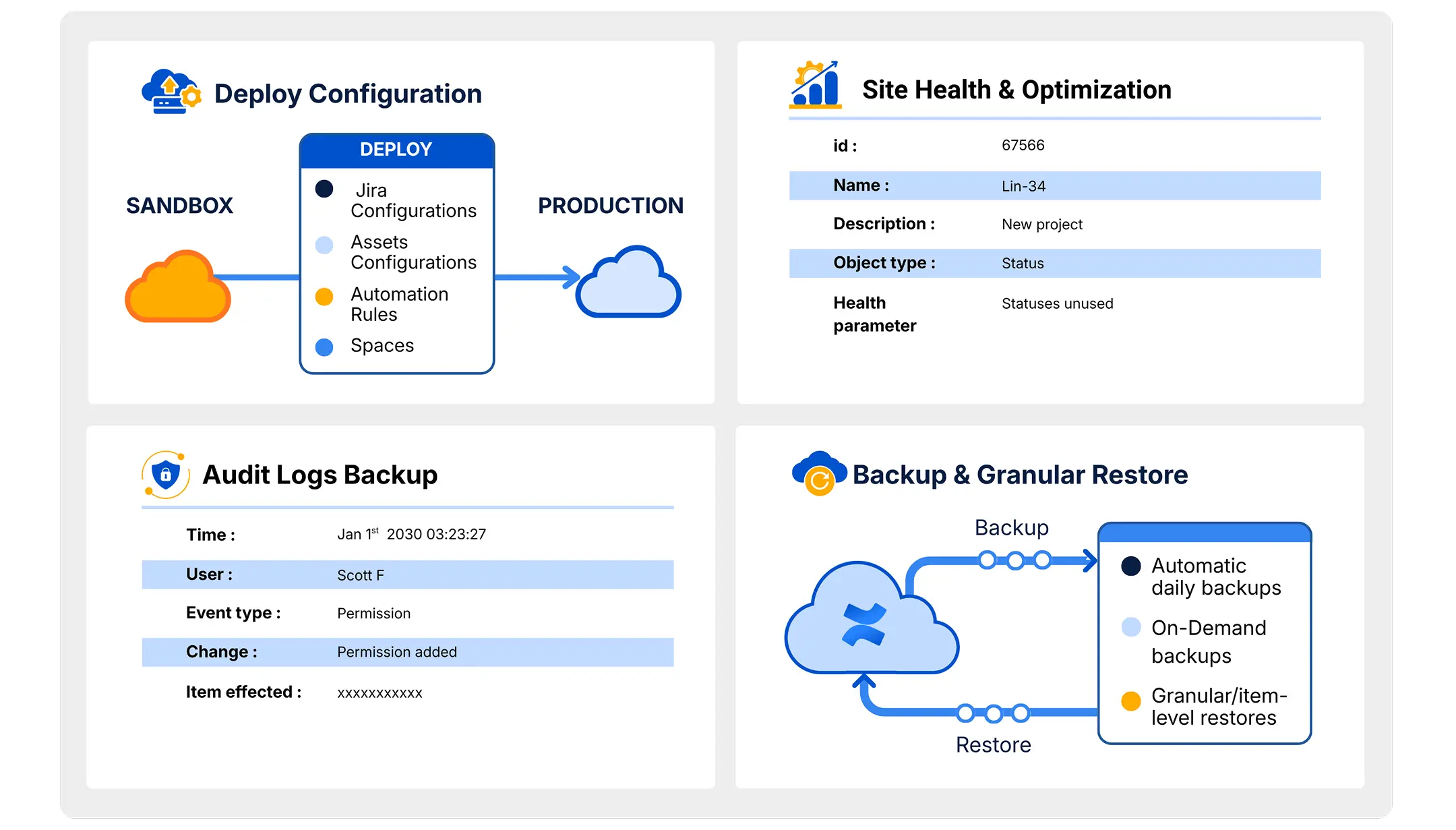
Version, deploy, and roll back Atlassian configurations across Jira, JSM, and Assets with a no-code UX and full audit trail. Compare environments visually, package dependencies automatically, and deploy in a single click—no scripting required.

Configuration Drift Analyzer
Instantly identify what changed in your Jira configuration, when it changed, and who changed it. Evaluate the current state against your desired baseline and simplify troubleshooting with visual diffs that replace hours of manual investigation.

Configuration Docs & Dependencies
Automatically generate configuration documentation for compliance and internal reference. Visualize the dependency map between configuration objects—workflows, screens, fields, and schemes—so you understand the impact of changes before you make them.

Xray Config Drift & Analytics
Extend configuration drift detection to your Xray test management app. Identify configuration changes, compare against desired state, and access deep analytics to understand drift patterns over time for your QA and testing environments.
Backup & Granular Restore
Full-fidelity automated backup and granular restore for all projects, data, and configurations across Jira, JSM, JPD, and Assets, including critical third-party app data.

Data Deletion Log
Strengthen your security posture and simplify audits with an immutable log of all deleted data. This permanent record captures every deleted Jira work item and service ticket, ensuring you have a complete history for support and recovery needs.

Audit Logs Backup
Jira’s native audit log retention is limited, creating risks for security and compliance. Our platform securely backs up your entire Jira audit history, giving you permanent access to every critical event.

Third-Party App Data Backup
Most backup solutions only protect native Jira data, leaving your critical Marketplace apps exposed. We close this security gap by extending full data protection to the third-party apps your teams rely on every day within Jira.

Data Cloning
Easily clone entire Jira and JSM projects—complete with their assets, schemes, and configurations, to create perfect sandboxes or onboard new teams in minutes.

User License Insights
Stop overpaying for Jira licenses. Our platform optimizes your Atlassian spend by identifying inactive users who are consuming costly license slots without contributing to any projects.

Site Health & Optimization
Fine-tune your Jira instance for peak performance. We monitor your most critical configurations and provide actionable metrics to pinpoint performance bottlenecks. By tracking changes across configuration versions, you can confidently optimize your instance for maximum efficiency.
Power up your Jira
Up and running in three steps
Command Center for Jira installs directly from the Atlassian Marketplace. No infrastructure to manage, no agents to deploy.
Install
Install the Revyz app from the Atlassian Marketplace in minutes. Connect your Jira, JSM, and Assets instances securely.
Configure
Set automated backup policies, connect your environments for config management, and define your compliance retention rules.
Command
Deploy configs with precision, recover data with a single click, and monitor your environment from one unified dashboard.
More capability. One platform.
No other Atlassian solution combines configuration management and data resilience in a single product.
All information is based on publicly available data as of June, 2026
| Capability | Revyz Command Center | Appfire |
|---|---|---|
| Configuration Management – Sandbox to Prod | ||
| Configuration Drift Analytics (Same and Across Sites: Jira, JSM, Tempo, Xray, Approval Path for Jira) | ||
| Configuration Docs and Dependencies (Jira, JSM, Tempo, Xray, Approval Path for Jira) | ||
| Xray Configuration Drift & Analytics | ||
| Backup & Granular Restore (Jira) | ||
| Backup & Granular Restore (JSM) | ||
| Data Deletion Log | ||
| Atlassian audit log backup | ||
| Third-party App Support• Backup & Restore: JMWE, JSU, Tempo worklogs • Backup: Scriptrunner, Approval Path for Jira | ||
| Data Cloning (Across and Same Site) | Limited Support | |
| User License Insights | ||
| Site Health & Optimization | ||
| Attachment Insights | ||
| End User Portal (Read-only “preview” of your Atlassian data for end users) | ||
| Automated, User- and Audit-Friendly Atlassian Data Exports | ||
| Read only View of Third-party App Configurations (Xray and Approval Path for Jira) |
All information is based on publicly available data as of June, 2026
| Capability | Revyz Command Center | Atlassian Native |
|---|---|---|
| Configuration Management – Sandbox to Prod | ||
| Configuration Drift Analytics (Same and Across Sites: Jira, JSM, Tempo, Xray, Approval Path for Jira) | ||
| Configuration Docs and Dependencies (Jira, JSM, Tempo, Xray, Approval Path for Jira) | ||
| Xray Configuration Drift & Analytics | ||
| Backup & Granular Restore (Jira) | Backup with Attachment References & Full Restore Only | |
| Backup & Granular Restore (JSM) | Backup with Attachment References & Full Restore Only | |
| Data Deletion Log | ||
| Atlassian audit log backup | Audit log data available only for 180 days before being overwritten, depending on your subscription tier. | |
| Third-party App Support• Backup & Restore: JMWE, JSU, Tempo worklogs • Backup: Scriptrunner, Approval Path for Jira | ||
| Data Cloning (Across and Same Site) | Creates duplicate configuration when going across sites | |
| User License Insights | ||
| Site Health & Optimization | Basic Reporting | |
| Attachment Insights | ||
| End User Portal (Read-only “preview” of your Atlassian data for end users) | ||
| Automated, User- and Audit-Friendly Atlassian Data Exports | Limited Support: Manual export required for individual Jira data | |
| Read only View of Third-party App Configurations (Xray and Approval Path for Jira) |
All information is based on publicly available data as of June, 2026
| Capability | Revyz Command Center | HYCU |
|---|---|---|
| Configuration Management – Sandbox to Prod | ||
| Configuration Drift Analytics (Same and Across Sites: Jira, JSM, Tempo, Xray, Approval Path for Jira) | ||
| Configuration Docs and Dependencies (Jira, JSM, Tempo, Xray, Approval Path for Jira) | ||
| Xray Configuration Drift & Analytics | ||
| Backup & Granular Restore (Jira) | ||
| Backup & Granular Restore (JSM) | ||
| Data Deletion Log | ||
| Atlassian audit log backup | ||
| Third-party App Support• Backup & Restore: JMWE, JSU, Tempo worklogs • Backup: Scriptrunner, Approval Path for Jira | ||
| Data Cloning (Across and Same Site) | ||
| User License Insights | ||
| Site Health & Optimization | ||
| Attachment Insights | ||
| End User Portal (Read-only “preview” of your Atlassian data for end users) | ||
| Automated, User- and Audit-Friendly Atlassian Data Exports | ||
| Read only View of Third-party App Configurations (Xray and Approval Path for Jira) |
All information is based on publicly available data as of June, 2026
| Capability | Revyz Command Center | Rewind |
|---|---|---|
| Configuration Management – Sandbox to Prod | ||
| Configuration Drift Analytics (Same and Across Sites: Jira, JSM, Tempo, Xray, Approval Path for Jira) | ||
| Configuration Docs and Dependencies (Jira, JSM, Tempo, Xray, Approval Path for Jira) | ||
| Xray Configuration Drift & Analytics | ||
| Backup & Granular Restore (Jira) | ||
| Backup & Granular Restore (JSM) | ||
| Data Deletion Log | ||
| Atlassian audit log backup | ||
| Third-party App Support• Backup & Restore: JMWE, JSU, Tempo worklogs • Backup: Scriptrunner, Approval Path for Jira | ||
| Data Cloning (Across and Same Site) | ||
| User License Insights | ||
| Site Health & Optimization | ||
| Attachment Insights | ||
| End User Portal (Read-only “preview” of your Atlassian data for end users) | ||
| Automated, User- and Audit-Friendly Atlassian Data Exports | ||
| Read only View of Third-party App Configurations (Xray and Approval Path for Jira) |
All information is based on publicly available data as of June, 2026
| Capability | Revyz Command Center | Rubrik |
|---|---|---|
| Configuration Management – Sandbox to Prod | ||
| Configuration Drift Analytics (Same and Across Sites: Jira, JSM, Tempo, Xray, Approval Path for Jira) | ||
| Configuration Docs and Dependencies (Jira, JSM, Tempo, Xray, Approval Path for Jira) | ||
| Xray Configuration Drift & Analytics | ||
| Backup & Granular Restore (Jira) | ||
| Backup & Granular Restore (JSM) | ||
| Data Deletion Log | ||
| Atlassian audit log backup | ||
| Third-party App Support• Backup & Restore: JMWE, JSU, Tempo worklogs • Backup: Scriptrunner, Approval Path for Jira | ||
| Data Cloning (Across and Same Site) | ||
| User License Insights | ||
| Site Health & Optimization | ||
| Attachment Insights | ||
| End User Portal (Read-only “preview” of your Atlassian data for end users) | ||
| Automated, User- and Audit-Friendly Atlassian Data Exports | ||
| Read only View of Third-party App Configurations (Xray and Approval Path for Jira) |
All information is based on publicly available data as of June, 2026
| Capability | Revyz Command Center | Salto |
|---|---|---|
| Configuration Management – Sandbox to Prod | ||
| Configuration Drift Analytics (Same and Across Sites: Jira, JSM, Tempo, Xray, Approval Path for Jira) | ||
| Configuration Docs and Dependencies (Jira, JSM, Tempo, Xray, Approval Path for Jira) | ||
| Xray Configuration Drift & Analytics | ||
| Backup & Granular Restore (Jira) | ||
| Backup & Granular Restore (JSM) | ||
| Data Deletion Log | ||
| Atlassian audit log backup | ||
| Third-party App Support• Backup & Restore: JMWE, JSU, Tempo worklogs • Backup: Scriptrunner, Approval Path for Jira | ||
| Data Cloning (Across and Same Site) | ||
| User License Insights | ||
| Site Health & Optimization | ||
| Attachment Insights | ||
| End User Portal (Read-only “preview” of your Atlassian data for end users) | ||
| Automated, User- and Audit-Friendly Atlassian Data Exports | ||
| Read only View of Third-party App Configurations (Xray and Approval Path for Jira) |


Book a Demo with Spin.AI
Schedule a 30-minute personalized demo with our security engineer
Built for the security and compliance requirements of enterprise Atlassian teams

SOC 2 Type 2 Audited
Independently audited security controls give your security and compliance teams the assurance they need.

Immutable, Object-Locked Storage
Backups are stored with object-lock immutability, ensuring they cannot be altered or deleted—even by a compromised admin account.

Bring Your Own Storage (BYOS)
Store backup data in your own AWS or Azure environment for full data sovereignty and residency compliance.

3-Year Data Retention
Retain backup data for up to 3 years in Revyz storage, or indefinitely in your own storage—meeting SOX, HIPAA, and long-term audit requirements.

Audit Log Extension
Atlassian’s native audit log is capped at 180 days. Command Center backs up your full audit history permanently, so you’re always ready for auditors.

Encrypted End-to-End
All data is encrypted in transit and at rest. Isolated, dedicated cloud compute ensures your data never shares infrastructure with other tenants.
Tailored value for every role
in your Atlassian ecosystem.
No other Atlassian solution combines configuration management and data resilience in a single product. All comparison data is based on publicly available information as of September 2025.
Extend your security perimeter to business-critical Jira data


OUTCOME
180→∞
Extend Jira audit log retention from Atlassian’s 180-day limit to long-term, compliance-grade storage (up to 3 years), unlimited with your own storage
1 Compromised Account≠Data Loss
Extend Jira audit log retention from Atlassian’s 180-day limit to long-term, compliance-grade storage (up to 3 years)
Reduce operational risk across your Jira ecosystem


OUTCOME
Reduce
Reduction in manual effort associated with Jira configuration documentation, comparison, and deployment workflows.
Take complete control of Jira administration


OUTCOME
Single Work Item→Entire Instance
Recover exactly the Jira data you need, from one work item to an entire Jira environment, without disruptive full-site restores.
Trusted by Jira admins and
IT teams at leading organizations.

“Highly recommend Revyz. The app is secure, easy to use, and backed by a responsive support team. If you manage a growing or complex Jira environment, Revyz is an incredibly valuable tool that brings peace of mind and operational efficiency.”


“Really nice and helpful tool. We went through the whole app with its features and settings in a demo session. Now we know much more. I would recommend the app—it fills a real gap for Jira configuration management.”


“Revyz has done a fantastic job meeting a need Jira and Confluence admins have had for a long time. The app is easy to use, intuitive, and scalable. It has become an essential part of how we manage our Atlassian environment.”

Questions Jira admins and
IT leaders ask us.
Direct answers to the questions that matter most when evaluating Jira data protection for your organization.
Command Center for Jira is the unified platform for protecting, managing, and governing Jira environments from Revyz (a Spin.AI company). It combines backup and granular restore, configuration management, configuration drift detection, audit log retention, data cloning, and administrative insights into a single solution for Jira Software, Jira Service Management, Assets, Jira Product Discovery, and connected Marketplace apps.
Yes. Spin.AI acquired Revyz in April 2026, and Revyz is now a Spin.AI company. Command Center for Jira is the same app on the same Atlassian Marketplace listing — your backups, configuration snapshots, Xray analytics and audit log extension are unchanged, no reinstall or migration is required, and support continues through the Revyz Support Center. Revyz has published a full breakdown of what the acquisition means for Command Center customers, covering product continuity, support, Marketplace availability and pricing.
While Atlassian protects its infrastructure, its shared responsibility model means customers remain responsible for data recovery, compliance, accidental deletion, misconfigurations, insider threats, or ransomware-related incidents. Command Center for Jira provides dedicated Jira backup and recovery capabilities designed to give organizations direct control over backup retention, restoration, audit history, and operational recovery.
Yes. Command Center for Jira supports backup and granular recovery, allowing you to restore specific Jira data without restoring an entire site. This includes work item-level recovery, project-level recovery, Jira configuration recovery, JSM assets, attachments, and other supported objects. This helps reduce downtime and avoids the disruption of full-environment restores.
Configuration management helps teams safely manage changes to Jira workflows, schemes, screens, permissions, service desks, and other configuration objects. Command Center for Jira enables teams to version, deploy, compare, document, and roll back configurations across environments using a no-code experience. This reduces change-related outages, improves governance, and simplifies promotion from sandbox to production.
Yes. Command Center for Jira extends beyond Jira Software and includes support for Jira Service Management, Assets, Jira Product Discovery, Jira Work Management, and selected third-party Marketplace applications. Backup, restore, configuration management, and other capabilities are designed to provide broad coverage across the Jira ecosystem.
Many compliance frameworks require organizations to retain audit records for significantly longer than 180 days. Once native audit logs expire, investigations, audits, and forensic reviews may be limited by missing historical data. Command Center for Jira backs up audit logs and extends retention to help organizations meet compliance, governance, and security requirements.
Revyz provides enterprise-grade security controls including SOC 2 Type II compliance, isolated cloud compute environments, data residency options, immutable storage capabilities, and Bring Your Own Storage (BYOS) support. Organizations can choose storage approaches that align with their security, sovereignty, and compliance requirements.
Configuration drift occurs when production Jira settings gradually diverge from an approved baseline or sandbox environment. Command Center for Jira continuously compares environments and highlights changes to workflows, service desks, projects, permissions, and other configuration elements. This helps administrators quickly identify unauthorized, unexpected, or undocumented changes before they create operational issues.
While configuration deployment is a shared capability, Command Center for Jira combines configuration management with backup and granular restore, configuration drift analysis, audit log backup, data deletion tracking, third-party app protection, data cloning, dependency mapping, configuration documentation generation, and operational insights within a single platform. Revyz positions this broader operational coverage as a key differentiator.
Yes. Revyz offers both personalized demonstrations and a free trial, allowing teams to evaluate Command Center for Jira before making a purchasing decision.
Stop worrying about your Jira data.
Start recovering with precision.
Join 1,000+ organizations using Command Center for Jira to protect, govern,
and optimize their Atlassian Cloud environment.







