Best CRXCavator Alternative for Extension Security

tl;dr executive summary:
As browser extensions become a growing security concern, organizations need tools that go beyond CRXCavator’s limited risk insights. Spin.AI Risk Assessment offers a more advanced, automated approach—analyzing permissions, data access, and behavioral risks across thousands of extensions in real time.
Unlike static scanners, it provides continuous monitoring, actionable threat intelligence, and integration with enterprise security workflows.
This article explores why Spin.AI is the leading CRXCavator alternative for proactive browser extension risk management and data protection.
Of the 300,000 browser extensions used in enterprise environments, more than half (51%) could execute potentially malicious behaviors, causing extensive damage to your organization. Fortunately, you can mitigate the risks of unsafe browser extensions through risk assessments. Proactive, continuous risk assessments of browser extensions will help you to identify extensions that may create security, privacy, business, or compliance risks in your firm, assess their risk levels, and determine what action is needed to mitigate the risk.
This guide will highlight the key features of CRXcavator, a popular but now-defunct risk assessment tool for browser extensions. It will also spotlight a great CRXcavator alternative that automates the risk assessment process so you can better minimize threats to your browser and data.

What Is CRXCavator?
CRXcavator was a free browser extension risk assessment tool from Duo Labs that enabled users to evaluate the security of their extensions.
CRXcavator was a free browser extension risk assessment tool from Duo Labs that enabled users to evaluate the security of their extensions. The tool would automatically and periodically evaluate the browser extensions in the Chrome, Firefox, and Edge web stores to identify areas of risk, such as which domains the extensions could communicate with, which external sites they could upload user data to, and coding issues that could create entry points for bad actors. CRXcavator then produced a quantified risk score for each browser extension that enabled security teams to make informed decisions about which extensions to manually allow or block.
Someone who is looking for CRXcavator’s alternative, the Spin.AI App and Browser Extension Risk Assessment is a powerful solution. It helps you evaluate browser extensions, detect potential risks, and enhance your organization’s security posture effectively

Why Is Spin.AI Risk Assessment the Leading Replacement for CRXCavator?
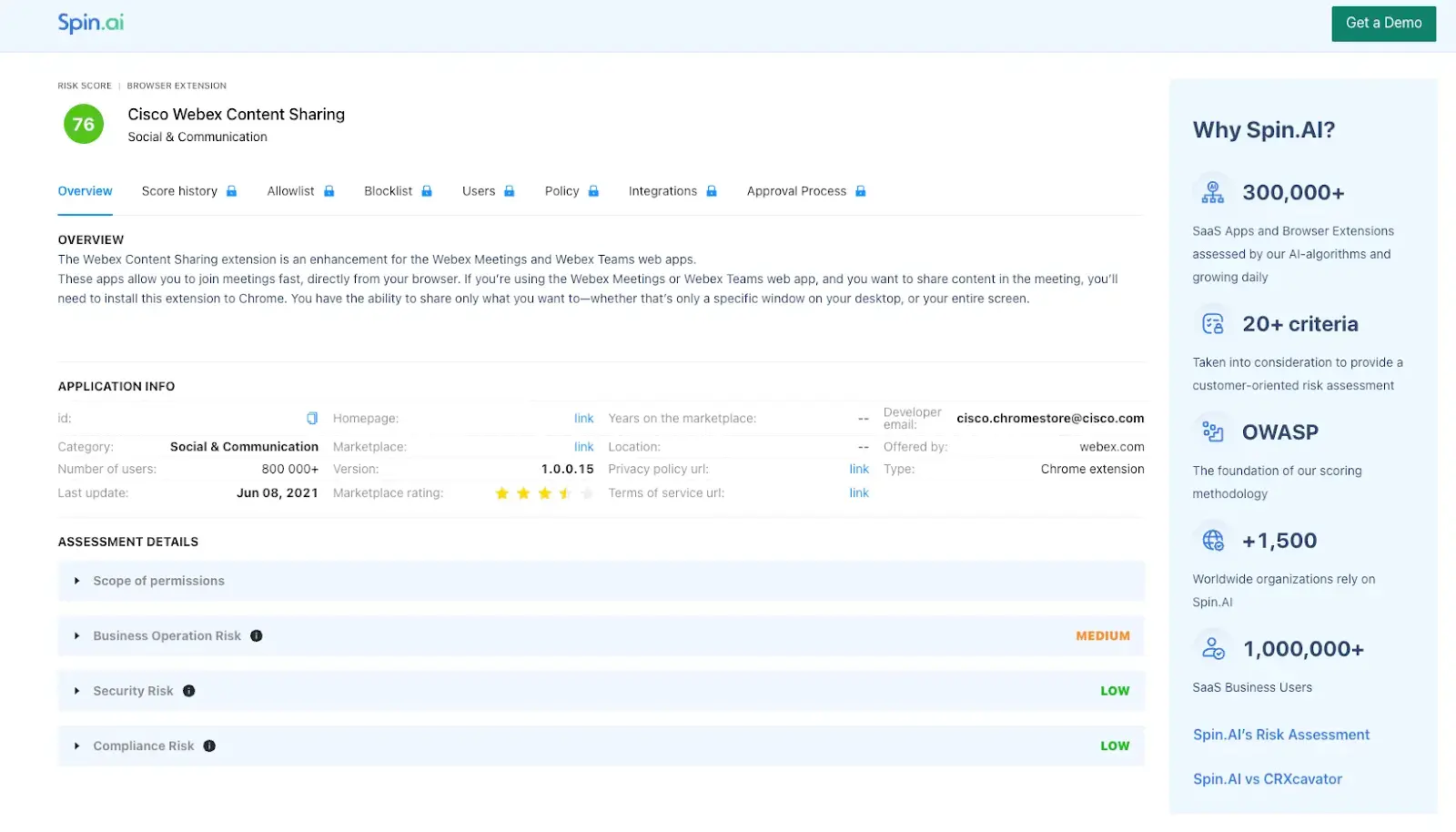
Spin.AI’s free App and Browser Extension Risk Assessment tool provides an easy way to assess the risks of browser extensions. Simply enter an extension’s name into the search bar. Within seconds, the tool will tell you the extension’s risk score and risk level. Use these insights to identify risky extensions and determine if you want to allow or block them.
You can also add the tool to Chrome to perform risk assessments from your own browser.

With this plugin, SpinProtect – Free Extension Security Checker, you can:
- Automatically detect and assess browser extension risks.
- Assess the permissions requested by each extension to determine if they are potentially risk-inducing.
- Get full visibility into the risks of each extension.
- Track the behaviors and permissions of installed extensions to detect and mitigate new risks.
- Confirm whether extensions comply with organizational security policies and privacy regulations.
If you need to quickly conduct risk assessments on thousands of browser extensions, try Spin.AI’s professional App and Browser Extension Risk Assessment solution. This powerful tool automatically and continuously assesses and re-assesses all your extensions (Chrome/Edge/Safari) to ensure rapid risk identification, fast incident response, and 24/7 protection.
The solutions’s AI algorithms have assessed a database of 1,000,000 browser extensions and SaaS apps and generate detailed insights, such as:
- scope of permissions
- numerical risk scores
- business operation risk
- compliance risk
- number of exploitable vulnerabilities
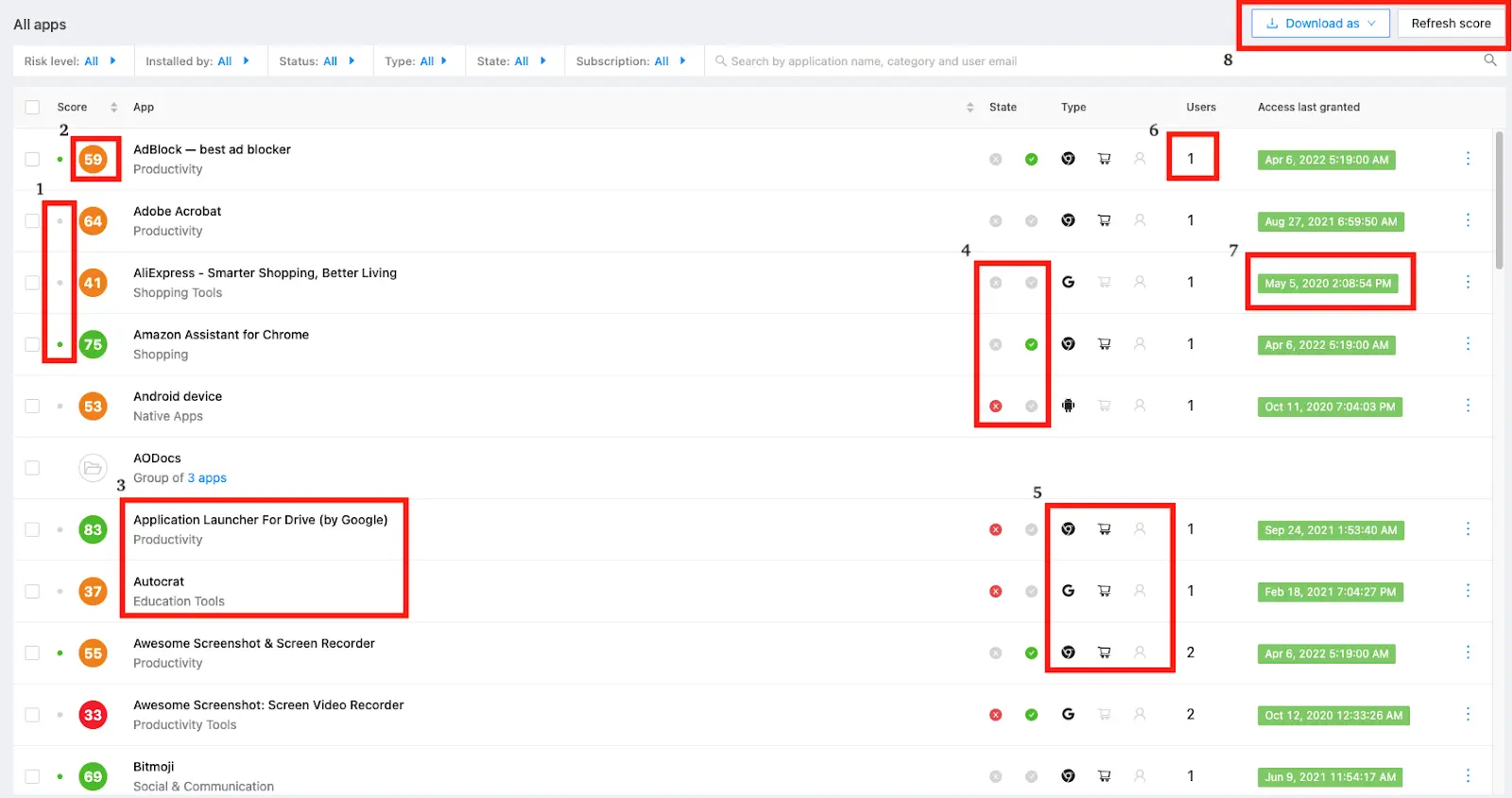
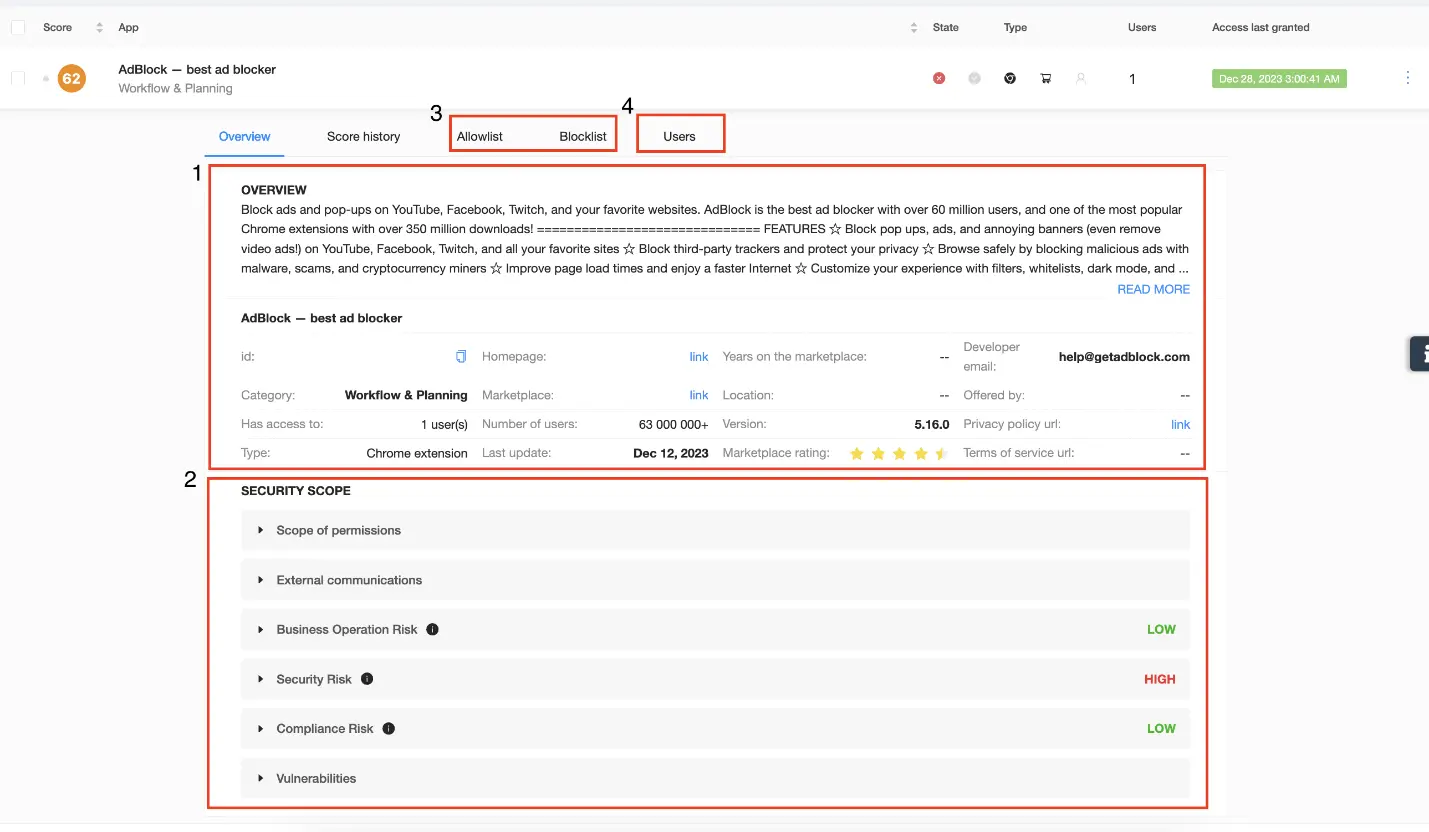
Leverage these meaningful insights to quickly identify high-, medium-, and low-risk extensions and determine which extensions to blocklist or allowlist to protect your organization from malware, adware, privacy violations, and other risks. You can even build workflows to manage and mitigate the risks of high-risk extensions differently than low- or medium-risk extensions.
Key Benefits of Spin.AI Risk Assessment Tool
Spin.AI’s App and Browser Extension Risk Assessment is the ideal CRXcavator alternative. Its AI algorithms search through a massive, ever-growing database of 1,000,000+ extensions and consider 15+ characteristics for each detected extension to discover and highlight risk in real-time.
In addition to risk assessments, Spin.AI automates access management and vulnerability scanning and detection. This makes it easy to implement workflows and extension blocklist/allowlist policies to effectively protect your organization from cyber threats and data breaches.
Another great benefit of Spin.AI risk assessment is that it is integrated into the Google Workspace™ Admin Console. This enables Google admins to easily view risk scores for all extensions. Having visibility into extensions used in your organization and knowing the risk scores of each is a crucial first step to risk mitigation and continuous protection.
Conclusion
With Spin.AI automated risk assessments, you have everything you need to reduce the risks of third-party apps and browser extensions and protect your organization from online threats and threat actors. Want to learn more about this feature-rich CRXcavator alternative? Click here to request a free demo!
FAQs
A risk assessment will help you to identify and evaluate the security, privacy, and compliance risks posed by the browser extensions used in your organization, and determine what controls are needed to minimize risk.
A risk assessment for browser extensions is an automated process in which a tool analyzes the permissions requested by an extension, checks whether it can access sensitive user data, and also identifies exploitable vulnerabilities in its code.
CRXcavator was a free risk assessment tool for browser extensions. It provided a numerical risk score that enabled users to determine how risky a particular browser extension was and then decide whether to allow or block that extension.
Spin.AI App and Browser Extension Risk Assessment is a good CRXcavator alternative. Spin.AI offers more advanced capabilities than CRXcavator, such as AI-driven assessments, risk history, security policies, and vulnerability scanning. It can also assess risks for third-party applications in addition to browser extensions.
Extensions can access sensitive data, inject scripts, or communicate with external servers—creating potential entry points for data leaks and malicious activity.