What Is a Man-in-the-Browser (MitB) Attack and How Do You Stop It?

- What Is a Man-in-the-Browser Attack?
- How Does a Man-in-the-Browser Attack Work?
- What Is the Difference Between Man-in-the-Browser and Man-in-the-Middle Attacks?
- What Are Real-World Examples of Man-in-the-Browser Attacks?
- Are Malicious Browser Extensions the Modern Man-in-the-Browser Attack?
- How Do You Prevent Man-in-the-Browser Attacks?
- How Does Spin.AI Protect Against Man-in-the-Browser Attacks?
- Frequently Asked Questions
A man-in-the-browser attack is dangerous for a simple reason: it operates inside the browser the user already trusts. There is no suspicious network warning, no broken padlock, no certificate error. The page looks right, the connection is encrypted, and the server sees nothing unusual. Yet between the moment a user types a value and the moment the server receives it, malware inside the browser can read it, change it, and hide the change.
That invisibility to both sides is what makes MitB so hard to catch.
tl;dr
- A man-in-the-browser (MitB) attack uses malware inside the browser to intercept and alter web sessions in real time, after the secure connection is established.
- HTTPS, TLS, and VPNs don’t stop it, because the malware acts on data after the browser decrypts it and before the browser encrypts what the user sends.
- It differs from man-in-the-middle (MitM), which intercepts traffic on the network instead of inside the browser.
- Zeus and SpyEye are the classic examples, both built to hijack online banking sessions. Today, malicious and compromised browser extensions carry the same technique into SaaS sessions.
- The strongest defenses are out-of-band transaction verification that shows the real transaction details, and strict control over which browser extensions can be installed.
What Is a Man-in-the-Browser Attack?
A man-in-the-browser (MitB) attack is malware that runs inside a trusted browser and reads or manipulates web sessions in real time, after encryption has already been removed.
OWASP describes MitB as a trojan that intercepts and manipulates calls between the browser and its security mechanisms on the fly, most often to commit financial fraud “even when other authentication factors are in use.” From that position, the malware observes and rewrites the pages the user loads and the data the user submits.
The key detail is where the attack lives. It runs inside the browser’s own process, which the user and the operating system treat as trusted. A network-level attacker has to contend with encryption. A MitB attacker does not, because it works on the plaintext the browser has already decrypted. For how MitB fits into the wider set of browser threats, see Spin.AI’s guide to browser security.
How Does a Man-in-the-Browser Attack Work?
A MitB attack follows a predictable lifecycle: the malware gets in, attaches to the browser, watches and edits traffic, then stays in place. Knowing these stages shows where a defense can actually intervene.
Step 1: Initial Compromise
The malware first has to reach the device. The most common delivery methods are a malicious download, a phishing link, or a compromised browser extension the user installs voluntarily.
Step 2: Attaching to the Browser
Next, the malware positions itself inside the browser. OWASP identifies the main techniques:
- API hooking: the trojan installs on the operating system, injects code into the running browser process, and hooks the functions the browser uses to send and receive web traffic. Classic banking trojans such as Zeus worked this way.
- Browser extensions and browser helper objects: add-ons that load inside the browser and get direct access to pages and form data.
- Malicious JavaScript: scripts that manipulate the page from within.
Whichever route it takes, the interception happens inside the legitimate browser process, so neither the user nor the server sees anything abnormal.
Step 3: Data Collection and Manipulation
Once attached, the malware can act on the session in three ways:
- Form grabbing: it reads form fields before submission, capturing credentials and payment data as the user types them. Extensions can do the same through keystroke capture and page access, as Spin.AI’s breakdown of how browser extensions exfiltrate data shows.
- Web injects: it rewrites the page the user sees, adding fields or changing account numbers, balances, and confirmations.
- Request tampering: it modifies outbound requests in flight, so the values reaching the server differ from what the user believes they sent, while the screen stays clean and convincing.
Step 4: Persistence
Finally, the malware works to stay in place. Because it operates within a trusted process, it can survive browser restarts and evade antivirus tools focused on system-level activity. Clearing the visible symptoms isn’t enough. If the delivery vector, such as the malicious extension or the original trojan, remains, re-infection is likely. Removing the vector is what ends the compromise.
What Is the Difference Between Man-in-the-Browser and Man-in-the-Middle Attacks?
A man-in-the-middle attack intercepts traffic on the network between the user and the server. A man-in-the-browser attack intercepts traffic inside the browser, on the user’s own device. Both place an attacker between the user and the service, which is why they get confused, but the architecture changes which defenses work.
| Man-in-the-Browser (MitB) | Man-in-the-Middle (MitM) | |
| Where it operates | Inside the browser on the user’s device | On the network between device and server |
| How it gets in | Trojan, malicious extension, or malicious script | Rogue Wi-Fi, ARP or DNS spoofing, forged certificates |
| Sees plaintext? | Yes, after the browser decrypts it | Only if it breaks or downgrades encryption |
| Does HTTPS/TLS stop it? | No | Largely, when certificates are validated |
| Does a VPN stop it? | No | Helps on untrusted networks |
| Visible warning signs | Usually none | Sometimes certificate errors |
| Best defenses | Out-of-band verification, extension control, browser-focused detection | TLS everywhere, certificate validation, trusted networks |
Why Doesn’t HTTPS Protect Against Man-in-the-Browser Attacks?
Encryption protects data as it travels across the network, which is exactly where a man-in-the-middle attack operates. A MitB attack acts after the browser decrypts the incoming page and before it encrypts the outgoing request, so the malware sees plaintext however strong the transport encryption is. A valid padlock proves the network path is secure. It says nothing about whether the browser itself has been compromised.
What Are Real-World Examples of Man-in-the-Browser Attacks?
Zeus
Zeus is the best-known MitB trojan. Spread largely through phishing campaigns and drive-by downloads, it targeted online banking sessions. Once installed, it captured credentials, injected extra fields into banking pages, and altered transactions as they were submitted. It could be configured to target specific banks, keeping its footprint small and hard to detect. A mobile companion, known as ZitMo (“Zeus in the Mobile”), was built to intercept the SMS confirmation codes banks sent to customers’ phones.
SpyEye
SpyEye emerged as a Zeus competitor and later absorbed much of the Zeus codebase. It specialized in the same banking fraud: capturing credentials, automating fraudulent transfers, and hiding its activity by editing the balances and confirmations the victim saw, so the account looked normal even as money moved.
Both illustrate the core threat model. The victim sees a normal session on a legitimate, encrypted site, while the malware rewrites the transaction underneath.
Are Malicious Browser Extensions the Modern Man-in-the-Browser Attack?
Yes. Banking trojans defined MitB, but browser extensions now deliver the same capability with far less effort. An extension with permission to read and change data on the sites a user visits sits in exactly the MitB position: inside the browser, after decryption, with access to every page and form. And it reaches that position through a normal install, not an exploit.
The scale is significant. Spin.AI’s research on the identity-to-browser attack path found that 53% of installed extensions grant access to sensitive data such as cookies, saved passwords, and page contents. In the RedDirection campaign, Spin.AI researchers uncovered malicious extensions affecting 14.2 million more users that intercepted web traffic and redirected people to attacker-controlled sites.
The target has widened too. Where Zeus went after bank accounts, extension-based attacks go after the SaaS sessions where business data lives: email, CRM, file storage, and admin consoles. A stolen session token can also bypass MFA entirely, as Spin.AI’s guide to preventing session token theft explains.
How Do You Prevent Man-in-the-Browser Attacks?
Because MitB subverts the browser itself, defenses that assume a trustworthy client are weak against it. The strongest protections either verify actions through a channel the browser can’t touch or stop the malware from getting in at all. Layer them; no single measure is enough.
1. Verify Transactions Out of Band
Confirm high-value actions on a separate device the browser can’t reach, and make sure that confirmation shows the actual transaction details: amount, recipient, and account. A generic “approve login” prompt can be triggered by the malware itself; a confirmation that displays what is really being sent lets the user spot the tampering. Prefer authenticator apps, hardware security keys, or dedicated transaction-signing over SMS, which the Zeus family specifically targeted.
2. Harden and Isolate the Browser
Use browser isolation and managed browser configurations that restrict which extensions and add-ons can load. CISA’s guidance on securing web browsers recommends organizations “limit your workforce’s options to just the browsers, versions, and settings that your organization permits/approves,” and notes that isolation “creates a logical barrier between the web browser and the rest of the system.”
3. Monitor Browser Process Behavior
Traditional antivirus watches system-level activity and can miss MitB. Behavioral detection that monitors browser processes, such as code injection into the browser, unexpected API hooking, or unusual page manipulation, has a better chance of catching it.
4. Control Which Extensions Can Be Installed
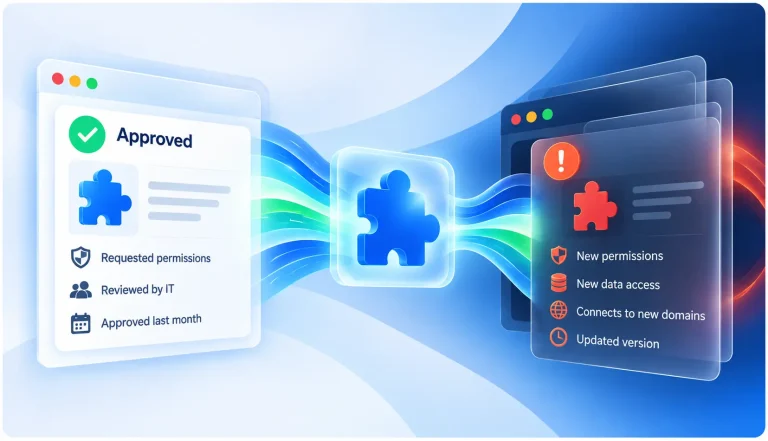
Malicious and compromised extensions are the most common delivery route today. Teach users to be skeptical of extensions, and restrict installs to an approved, vetted set with continuous monitoring for extensions that change after approval.
5. Detect Fraud on the Server Side
Even when the client is compromised, anomaly detection on transaction patterns can catch the result. Unusual amounts, new payee accounts, or odd timing can flag a manipulated transaction that looked normal on the user’s screen.
Does a VPN Protect Against Man-in-the-Browser Attacks?
No. A VPN secures the network path between the device and its destination, which helps against network-level interception. MitB runs inside the browser after the connection is established, so encrypting the path does nothing against malware already on the trusted side of it.
How Does Spin.AI Protect Against Man-in-the-Browser Attacks?
Man-in-the-browser attacks most often enter today through a browser extension, and that is exactly where Spin.AI Browser Security works. It gives security teams complete visibility into every extension across every browser, profile, and device in the organization, across Chrome, Edge, Safari, and Firefox. It scores extension risk using assessments of more than 1,000,000 browser extensions, continuously reassesses them as they update, and automatically blocks or removes risky and compromised extensions through granular security policies. The result is a browser environment where the most common MitB entry point is closed.
Frequently Asked Questions
It is malware hiding inside your web browser that quietly changes what you see and what you send. You interact with a real, encrypted website, but the malware reads your data and can alter your transactions before the server receives them.
No. HTTPS encrypts data as it travels across the network, but a MitB attack operates inside the browser after that data has been decrypted. The malware sees and manipulates plaintext regardless of encryption strength.
A man-in-the-middle attack intercepts traffic on the network between the client and server. A man-in-the-browser attack intercepts inside the browser on the user’s own device, after the secure connection is already established.
No. A VPN secures the network path, but MitB malware runs inside the browser after the connection is established. Securing the path does nothing against an attacker already on the trusted side of it.
Not on its own. MitB malware acts inside a session the user has already authenticated, so standard MFA at login doesn’t block it. Out-of-band confirmation that displays the real transaction details is far more effective, because the user can see what is actually being approved.
Yes. An extension with permission to read and change data on the websites you visit has the same access MitB malware needs. Malicious and compromised extensions are now one of the most common ways MitB-style attacks reach users.
Zeus and SpyEye are the best-known examples. Both were banking trojans that captured credentials and altered online banking transactions in real time while showing victims a normal-looking account.
Often you can’t from the screen, because the malware hides its changes. Warning signs include transactions you didn’t authorize, confirmation codes for actions you didn’t take, unfamiliar extensions, and bank or account alerts that don’t match what the browser shows.
Out-of-band transaction verification is the most direct defense, because the malware can’t alter a confirmation shown on a separate device. Pair it with strict control over which browser extensions can be installed to close the most common delivery route.